
Why dividing area doesn't work
The tempting shortcut is: add up the area of all your parts, divide by the area of one sheet, round up. It feels right, but it is optimistic. Area math assumes you can fill a sheet to 100 percent, and you never can, rectangular parts leave gaps and offcuts, and the saw kerf removes a few millimeters at every cut. In practice you might use a sheet to 80 percent, so the real count comes out higher. Trusting area math is how you end up one sheet short on a Sunday.
A quick estimate
If you just want a safe number to buy:
- Add up the area of all your parts.
- Divide by the sheet area, then divide by about 0.85 to allow for waste.
- Round up, and add one spare sheet for mistakes or grain.
That gives a number you are unlikely to fall short of. It still over-buys a little, which is why a real layout is better when it matters.
The exact number: a real layout
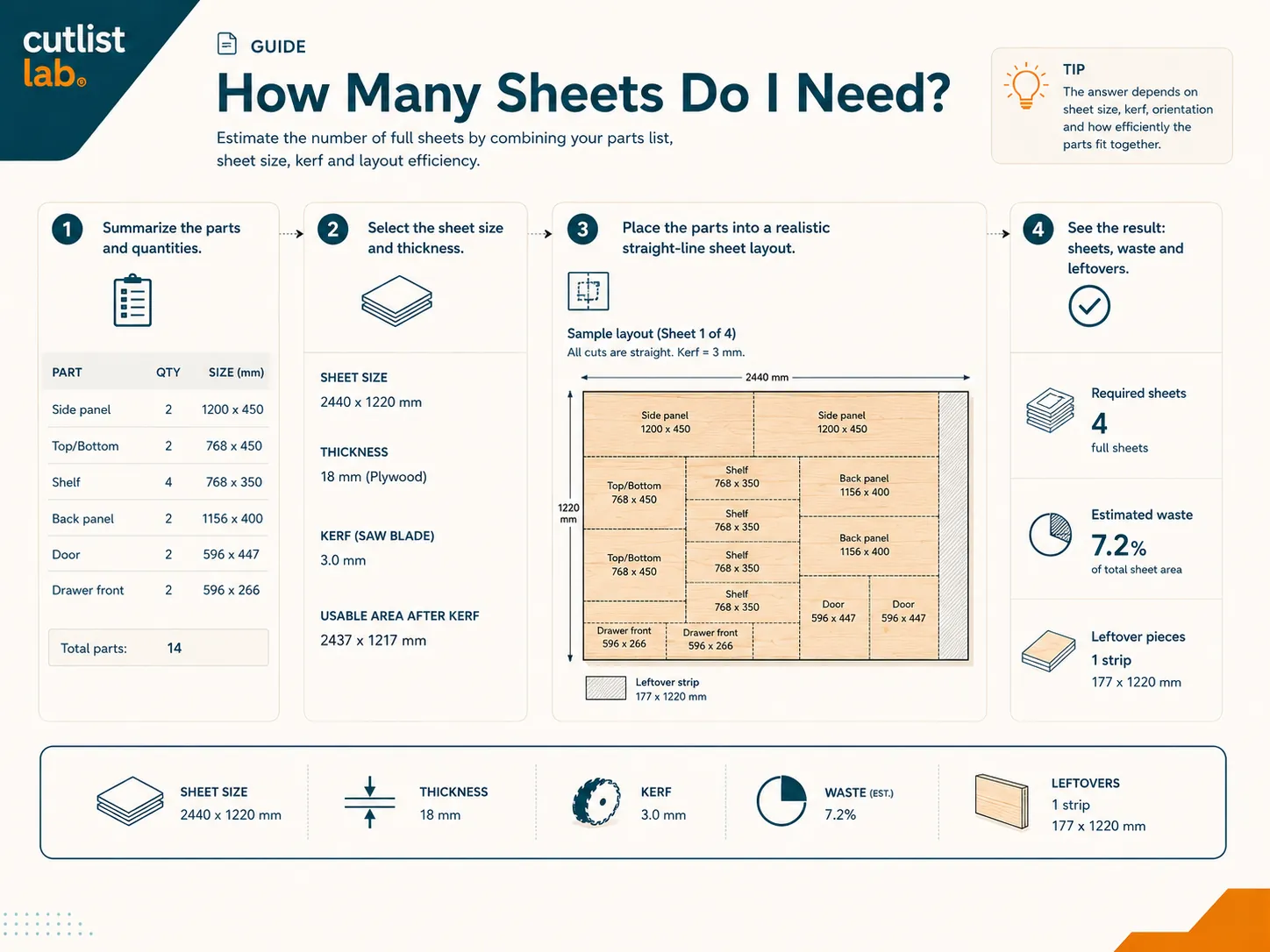
The only way to know for sure is to lay the parts out. cutlistlab nests your parts onto sheets with the least waste and tells you exactly how many you need, with the layout, the cutting order, and the waste percentage. Change a size or a sheet format and the number updates instantly, so you can see when a small tweak saves a whole sheet.
How to need fewer sheets
- Let parts rotate. Where the grain allows it, rotating parts often fills a sheet far better.
- Match the sheet size to your parts. A different standard size can nest your parts with much less waste.
- Use offcuts first. Keep leftovers from earlier projects and slot them in before buying new.
- Optimize for waste. Let the tool aim for the least waste instead of the fewest cuts when the goal is fewer sheets.
Let the tool count for you. In cutlistlab, enter your parts and you get the exact number of sheets, the layout and the waste, free, no account. Or design a cabinet and the sheet count comes out of the panel sizes automatically.
A worked example
Say you are building a bookcase and your parts look like this:
| Part | Size (mm) | Qty |
|---|---|---|
| Side panel | 1800 × 300 | 2 |
| Top and bottom | 764 × 300 | 2 |
| Shelf | 764 × 280 | 4 |
| Back panel | 1788 × 788 | 1 |
The total area of these parts is about 3.8 m² (roughly 41 sq ft). A standard 2440 × 1220 mm sheet, almost the same as a 4 × 8 ft sheet, is about 2.98 m². Dividing area by area gives 3.8 ÷ 2.98 ≈ 1.3 sheets. But you cannot buy 1.3 sheets, and a part cannot be split across the seam between two sheets, so you round up: at least 2. The real layout confirms 2 sheets, with a good usable offcut left on the second. That is exactly why dividing by area only gives a floor, and the tool builds the real layout, kerf and grain included.
Frequently asked questions
Can I just divide total area by sheet area?
No. Area math assumes a perfect fill; real parts leave waste and the kerf removes material at every cut. Always round up and add a margin, or use a real layout.
How do I get the exact number?
Lay the parts out for real. cutlistlab nests them onto sheets and tells you exactly how many, with the layout and waste percentage.
How do I need fewer sheets?
Let parts rotate where grain allows, pick a sheet size that suits your parts, use offcuts first, and optimize for the least waste.