
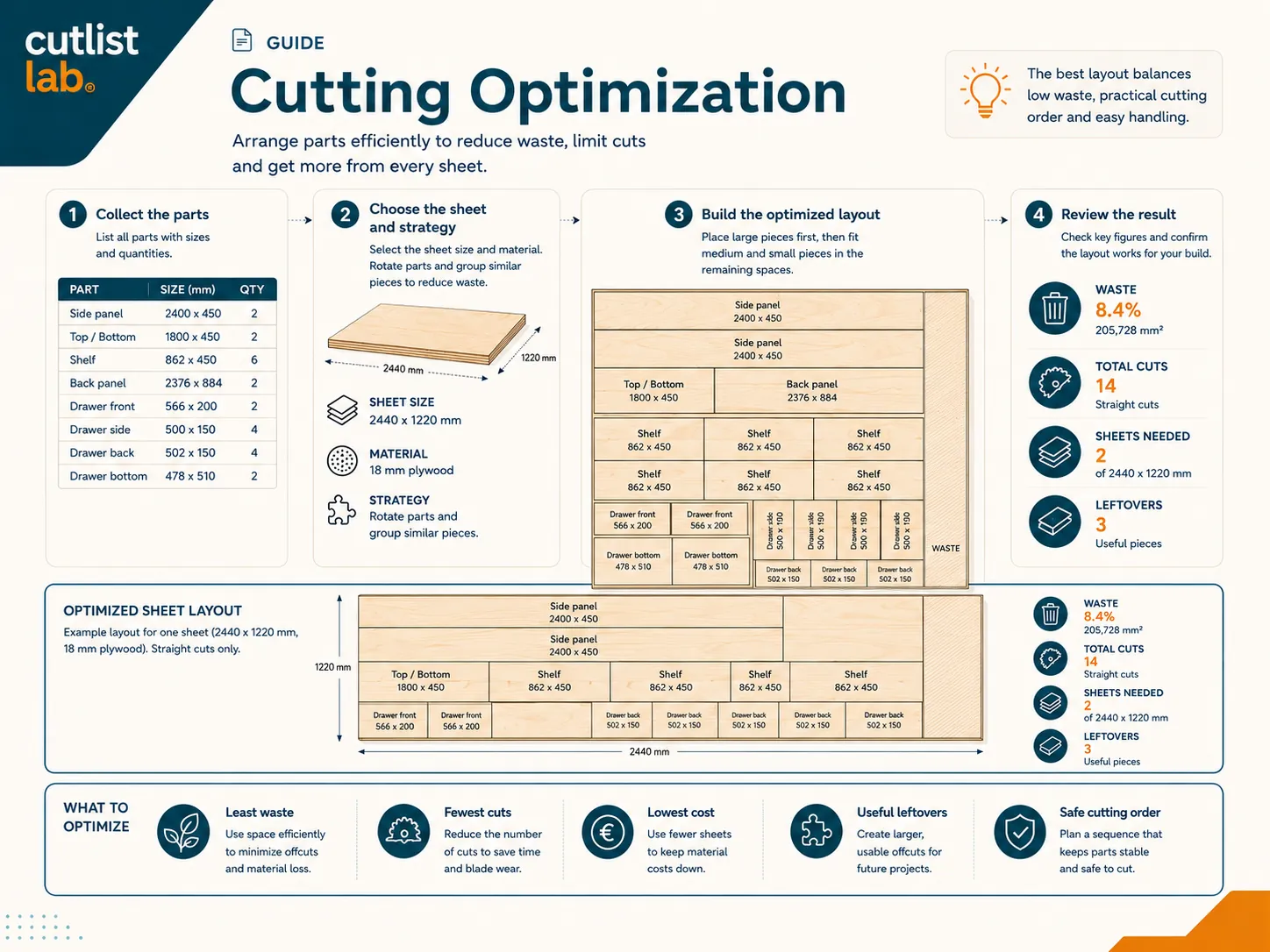
What is cut optimization?
Cut optimization means arranging all your parts on as few sheets as possible with the least waste. It is a packing puzzle: fit a set of rectangles into bigger rectangles, leaving the smallest gaps. By hand it is slow and you rarely find the best answer. A good optimizer tries many arrangements and keeps the best one in a second.
What a good layout accounts for
- The saw kerf. Every cut removes material, so the layout reserves a gap at each cut.
- The grain direction. Visible plywood and wood-decor parts keep their grain aligned; grain-free sheets can rotate freely.
- Matching material and thickness. A part only goes on a sheet of the same material and thickness.
- Usable offcuts. A clever layout leaves leftovers in useful sizes, not slivers, so your stock stays handy.
- A sensible cutting order. Long full-sheet cuts first, small parts last, straighter and safer to saw.
Three goals you can optimize for
The "best" layout depends on what you care about:
- Least waste. Squeeze the most parts onto the fewest sheets. Best when material is the cost.
- Fewest cuts. A simpler layout that is faster and easier to saw, even if it wastes a little more.
- Lowest cost. When you enter sheet prices, pick the cheapest combination, which is not always the fewest sheets.
From cut list to cutting plan
Optimization starts from a cut list: your parts with their sizes, material and thickness. Pick a sheet size, choose your goal, and the optimizer returns a layout, the number of sheets, a numbered cutting order and the waste percentage. Allow parts to rotate where the grain permits, and feed in any offcuts you already have, to push the waste down further.
Try it on your own parts. cutlistlab optimizes your layout for least waste, fewest cuts or lowest cost, accounts for the kerf and grain, and uses your offcuts first, free, no account, on your phone.
By hand or optimized: an example
Take a cabinet with around fourteen parts in 18 mm board. Lay them out by hand, type by type and without rotating, and you quickly hit half-empty sheets and end up on 3 sheets with a lot of small waste. Let the optimizer rotate parts where the grain allows and mix large and small pieces, and they often fit on 2 sheets. That is a whole sheet saved, about a third less material.
| Approach | Sheets | Waste |
|---|---|---|
| By hand, in order, no rotation | 3 | High, lots of offcuts |
| Optimized, rotate and mix | 2 | Low, larger usable offcut |
The gain comes from three things: rotating parts so they fit tighter gaps, combining large and small pieces instead of grouping by type, and using your offcuts first. The numbers above are an example; your own saving depends on your parts, but it is almost always leaner than by hand.
Frequently asked questions
What is cut optimization?
Arranging all your parts on as few sheets as possible with the least waste, respecting the kerf, the grain and matching sheets. A packing problem a tool solves far better than guessing.
Can I optimize for something other than waste?
Yes, least waste, fewest cuts, or lowest cost when you enter prices. The best layout depends on what matters most.
Does it really save material?
Often a whole sheet. A good layout rotates parts where allowed, groups similar sizes and keeps offcuts usable.