
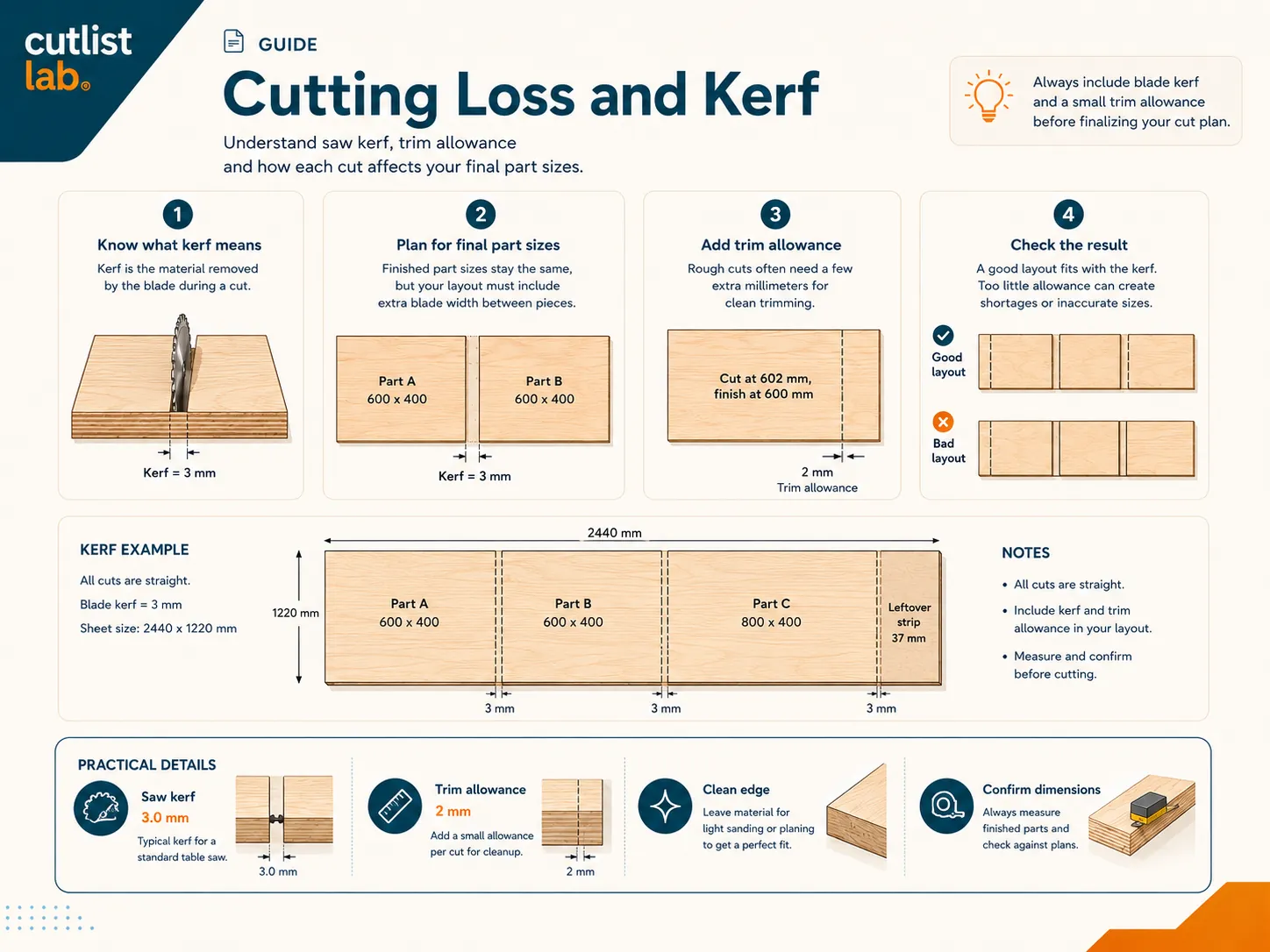
What is kerf?
The kerf is the width of the slot the blade carves out as it cuts. The teeth are set slightly wider than the blade body, so they remove a strip of material a couple of millimeters wide. A typical circular saw or table saw blade has a kerf of about 2 to 3 mm (around 1/8 in); a thin-kerf blade is a little less, a track saw similar. It is not waste you can avoid, it is simply gone with every pass.
Why it adds up
One cut losing 3 mm is nothing. But a sheet cut into many parts has many cuts, and every cut between two pieces eats another kerf. Lay out, say, ten strips across a sheet and you have made nine cuts, roughly 27 mm gone, just to the blade. Ignore that and the last strip is suddenly 27 mm too narrow. This is the classic reason a layout that looks fine on paper does not quite fit in real wood.
A worked example
Take a sheet 2440 mm wide and cut it into strips 300 mm each. By area you would expect 8 strips (2400 mm) with 40 mm to spare. But with a 3 mm kerf, every cut also removes 3 mm. Eight strips need seven cuts between them, 21 mm, plus the strips themselves, so 2400 + 21 = 2421 mm. You just fit, with 19 mm left, not 40. Add a trim cut to square the edge and the eighth strip can disappear entirely. The kerf decides it.
Account for the kerf automatically
You do not have to do this math by hand. Set your blade kerf once, and a good cutting plan reserves a kerf-wide gap at every cut. You enter the finished sizes of your parts; the tool spaces the cuts so the pieces come out exactly to size, and the sheet count reflects the real loss.
Working with baseboard, battens or framing? The kerf counts per cut there just as much: see cutting baseboard corners.
How to account for it at the saw
- Measure your blade's kerf once (or read it off the blade) and set it in the tool.
- Cut to the waste side of the line so the kept piece keeps its full size.
- Follow the numbered cutting order so the gaps the plan reserved line up with your cuts.
- Add a trim cut if your sheet has a rough or factory edge; reserve it in the plan.
Let the tool reserve the kerf. In cutlistlab you set the kerf (and any edge trim) in the settings, and the cutting plan spaces every cut for you, free, no account. Your finished parts come out to size.
Frequently asked questions
What is the saw kerf?
The width of material the blade removes at each cut, typically about 2 to 3 mm (around 1/8 in) for a circular or table saw. It is the slot the teeth carve out.
Why does it matter for a cutting plan?
Every cut between two parts removes a kerf-width. Across a sheet that adds up to centimeters, enough to make parts fit or come up short. A good plan reserves it.
How do I account for it?
Set your blade kerf once and the plan leaves a kerf-wide gap between parts. You enter finished sizes; the tool spaces the cuts.