
cutlistlab › Manual › Excel and CSV in and out
Chapter 21
Excel and CSV in and out
Paste parts in from Excel in one go, and get your cut list back as a file.
Reading parts in
If your sizes are already in a spreadsheet, use Paste multiple from Excel or CSV below the parts list. There is no need to retype them.
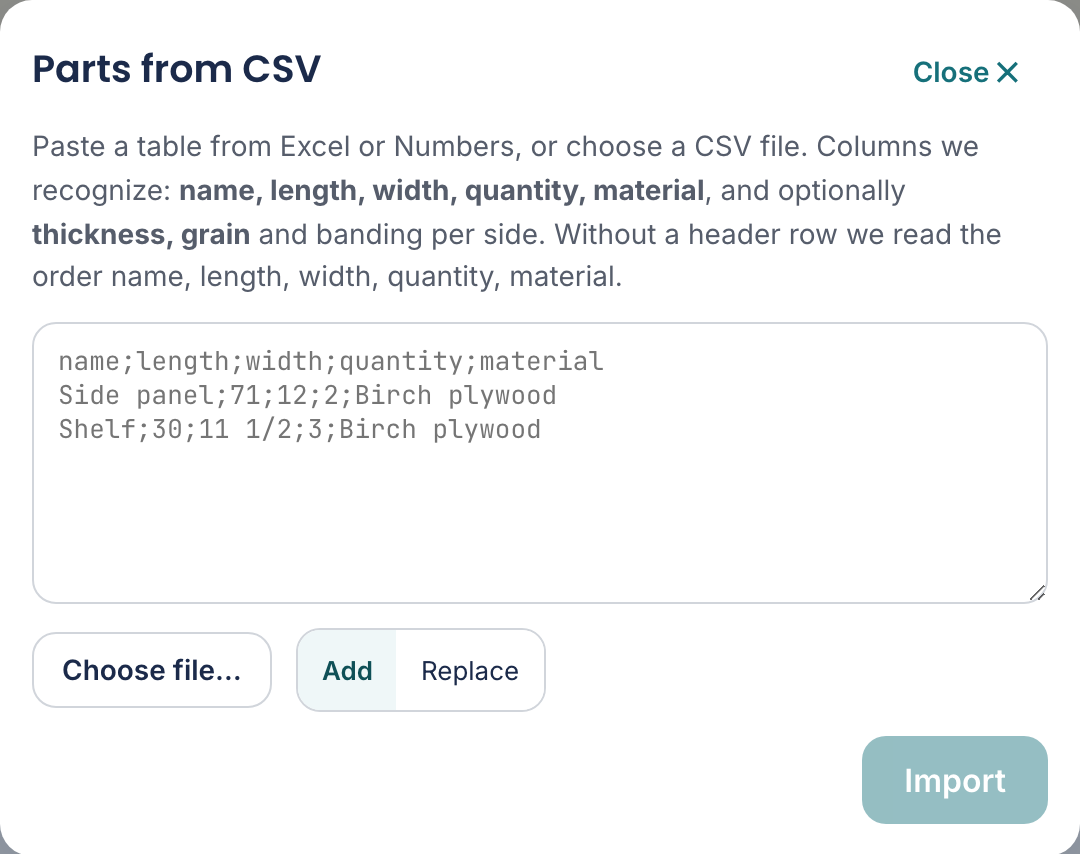
Paste a table from Excel or Numbers, or choose a file (.xlsx, .ods or .csv). Columns we recognize: name, length, width, quantity, material, and optionally thickness, grain and banding per side. Next you see per column what we read, and you can change it.
You can literally copy a block of cells from Excel, Numbers or Google Sheets and paste it into the box. Tabs, semicolons and commas are all recognised. Or pick the file itself with Choose file…: an Excel file (.xlsx), a LibreOffice file (.ods) or a CSV. From a workbook we read the first sheet. The old Excel format (.xls) we cannot read; save it as .xlsx in Excel first.
When you are on the Linear tab, the import is about pieces cut to length. The columns are then Name, Length, Quantity, Material and Section. Such a piece has no width; you fill in the bars they come from yourself.
Checking before you import
As soon as there is something in the box or you choose a file, you see per column what the tool makes of it: the header from your file (or the column letter), three values from it, and a list with Name, Length, Width, Quantity, Material, Thickness, Grain, the banding per side or Don't use. If a column is wrong, choose yourself. A field belongs to one column: pick Length for another column and the old one switches to Don't use.
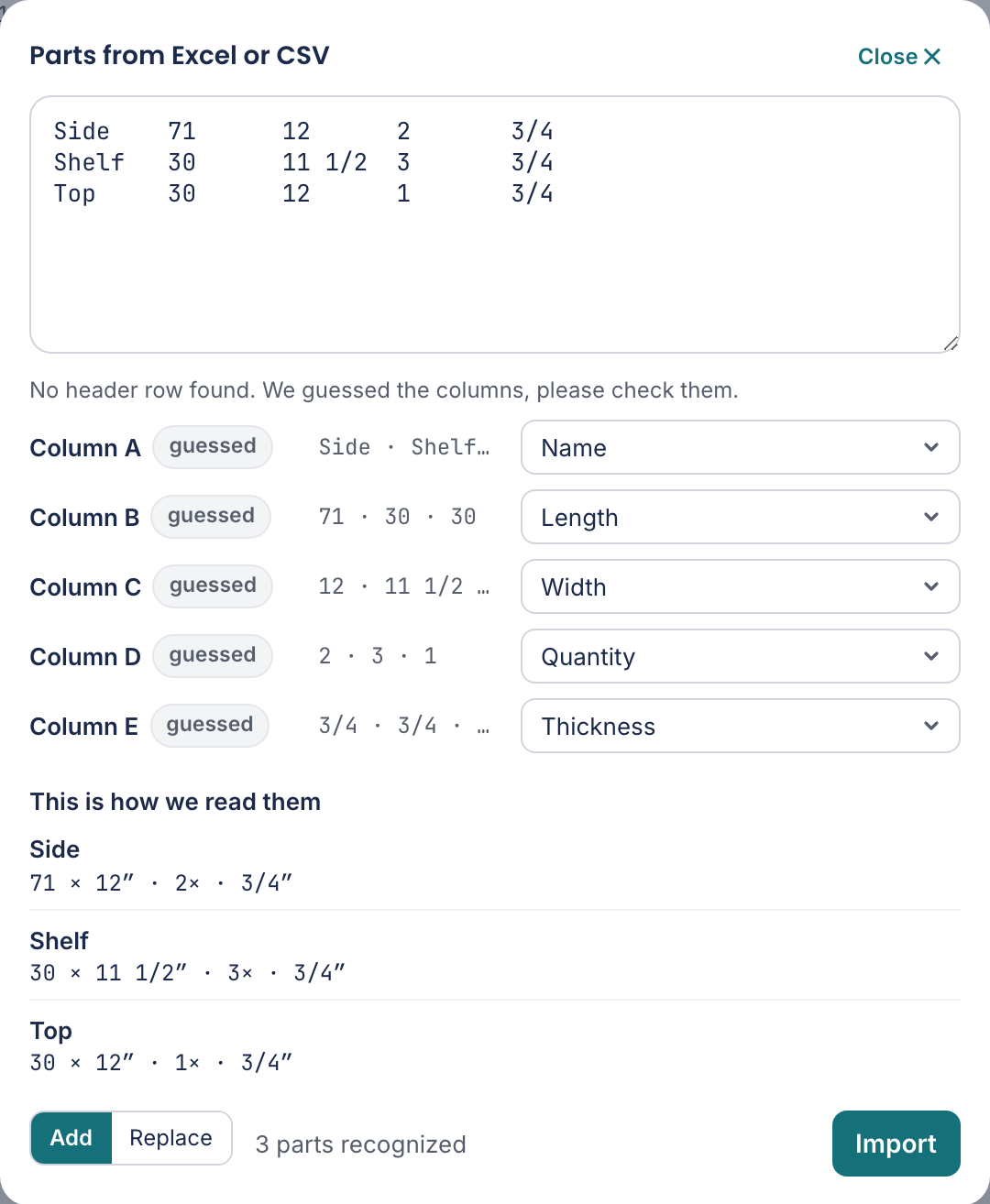
At the top it says how the columns were found: Columns recognized from the header row. Without a header row the tool looks at the contents: text becomes the name, the two largest sizes become length and width, small whole numbers the quantity. It then says No header row found. We guessed the columns, please check them. and every guessed column gets the label guessed. Under This is how we read them you see the first three parts as they will land in your list. That shows a wrong column or unit at once.
- Unit in the file
- Appears when the sizes do not seem to fit your unit, for example a list in millimetres while the app works in inches. It then says The largest size is now 1800". Are the sizes in mm? with the button Read as mm. Nothing is converted by itself: if your list is right after all, leave it. If the unit is in the header, such as "Length (mm)", the tool reads it correctly straight away.
- 2 rows skipped
- Rows that cannot come along, with row number and reason, such as Row 7: no length or width or Row 7: 3000" is too large (over 787 3/8"). The row number is the row in your Excel sheet. Empty rows do not count.
- Choose again
- After choosing a file its name sits above the columns. With this button you start again with another file or by pasting.
If you paste a table straight into the parts form, it goes into your list at once when there is nothing to doubt: a recognised header row, or name, length, width and quantity in that order. If the tool is unsure (another order, sizes that look like centimetres, a row that cannot come along), this window opens with your pasted table and the message We're not sure about the columns of this pasted table. Please check them below.
Which columns it knows
| Column header | Meaning |
|---|---|
| name | The name of the part. Empty? Then it becomes Part. |
| final_length / final_width | The size the piece must end up at, so including edge banding. |
| cut_length / cut_width | The size you cut at. See Sizes and units. |
| quantity | How many pieces. Empty counts as 1. |
| material | The material name. Must match a sheet in your list. |
| thickness | The sheet thickness, optional. |
| grain | The grain direction, optional. See Grain and edge banding. |
| edge_left, edge_right, edge_top, edge_bottom | Edge banding per side, optional. |
The headers may also be in Dutch or German, and abbreviated: the tool also recognises L, W, Qty and Pcs. A title row above the header, or a sheet that only starts in column B, is no problem. The same table sits in the window itself under Which columns can I use?, with per column whether it is required and an example value, and the button Sample (Excel) gives an Excel file with all columns and two example rows that you can open and fill in.
At the bottom you choose whether the new rows join your existing list (Add) or replace it (Replace). When replacing, the button reads Replace list, and afterwards the tool reports: (list replaced) If you are still looking at the example project, Replace is already on: your own list then takes the place of the example parts.
From a 3D model (Fusion 360, SketchUp)
If you draw in Fusion 360, SketchUp or Onshape, there is no need to retype the sizes. Choose Parts from 3D model below the parts list, and drop your export into the box. We read STEP, OBJ and STL. The native file of Fusion (.f3d) or SketchUp (.skp) we cannot read; the export we can.
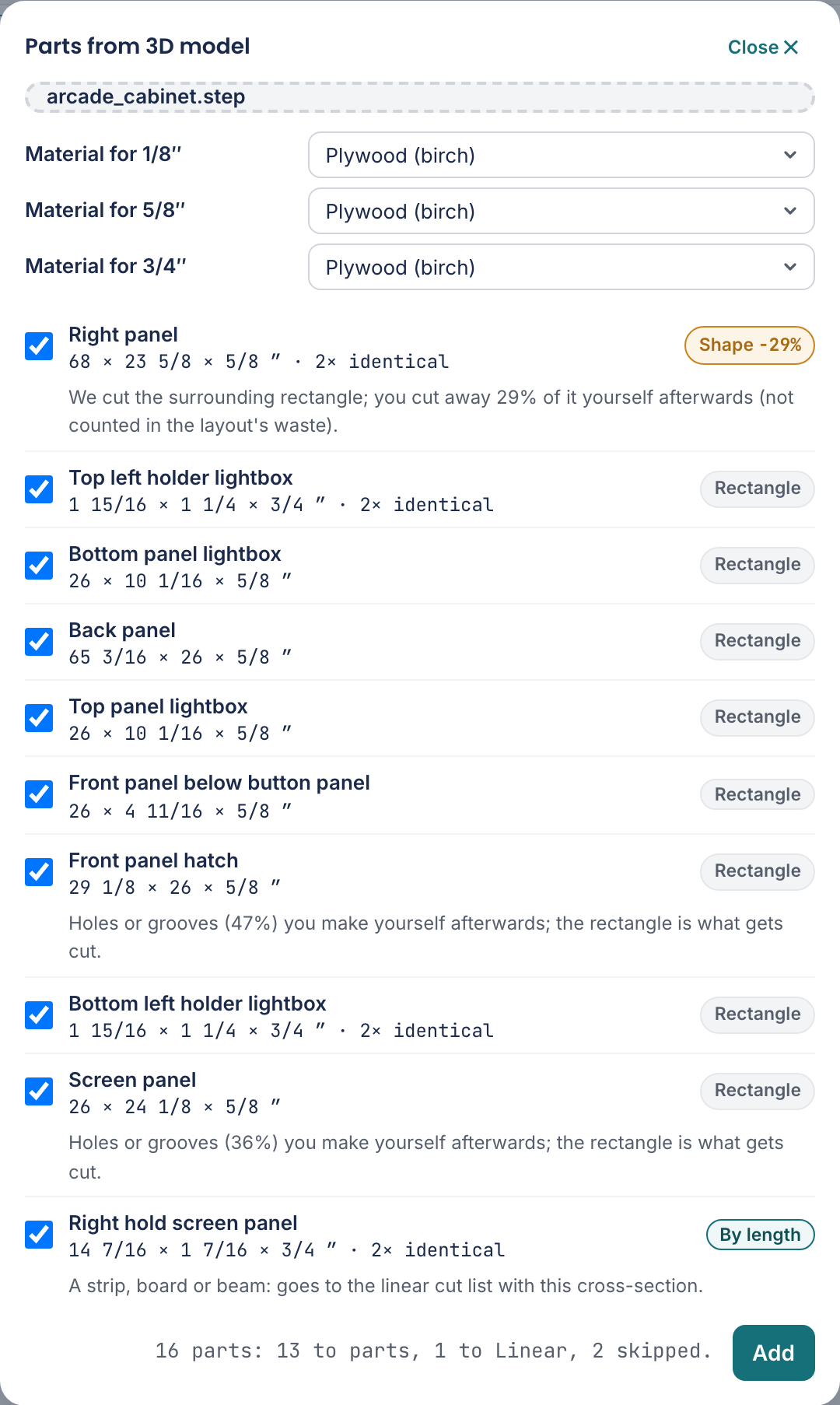
If you drop a STEP file that Zaaglab made itself (3D model (STEP)), you first get the choice Open project or Only add parts. With Open project the cabinet is back exactly as it was.
How to export. In Fusion 360: File → Export → STEP. Or right-click a component in the browser → Save as Mesh → OBJ, unit millimetre. Fusion exports visible bodies only, so hide hardware, screws and dowels before you export. In SketchUp Pro: File → Export → 3D Model → OBJ, and set the unit to millimetre (it defaults to model units). Give every body or group a name; otherwise everything is called "Body1".
For every body we measure the smallest enclosing box, even when the part sits at an angle in the model: the largest size becomes the length, the smallest the thickness. Identical parts are added up into a quantity. Every row gets a label:
- Rectangle
- Cut as is. If it has holes or grooves we say how much; you make those yourself afterwards.
- Shape
- The outline is not a rectangle (a slanted side, a rounded corner). We cut the surrounding rectangle; the percentage is what you cut away yourself afterwards. That loss is not in the layout's waste.
- By length
- A batten, stud or board, such as 19×37 or 44×69: it goes to the Linear tab with its cross-section. A round bar or dowel rod also goes to length, with the diameter as its cross-section (Ø20). Click the label if you want it as a sheet part after all.
- Not flat
- Not a panel: a block, a piece of hardware or a hollow shape such as a whole drawer. Off by default. Tick it anyway and it becomes a rectangle of the two largest sizes.
- Unit in the file
- Only for OBJ and STL: those files do not say whether they are in millimetres or inches. The line "The whole model measures …" shows whether you are right; a cabinet of 1.7 × 0.6 × 0.5 is not millimetres.
- Material for 18 mm
- A model does not know what material a part is. Per thickness you choose one material from your sheets; leave it open and the part gets your first sheet. If the thickness is not a common sheet thickness here (16 mm in the Netherlands) we say so and you can pick a neighbouring size. Mind: the inside sizes of your design then no longer match.
Getting the cut list out
The other way round works too: Cut list as CSV under Export gives you a file with all pieces and their sizes.
That is what a cutting service usually wants: a list of sizes and quantities, not a picture. Ask in advance whether they accept a file and in which format.