
cutlistlab › Manual › What do I need
Chapter 23
What do I need
The shopping list: sheets, edge banding and hardware with quantities and guide prices, calculated from your own plan.
Opening the list
The What do I need button has a text label above the cutting plan on desktop and mobile, and is also in Export. The list covers the whole project. Without a plan yet it says Make a cutting plan first.
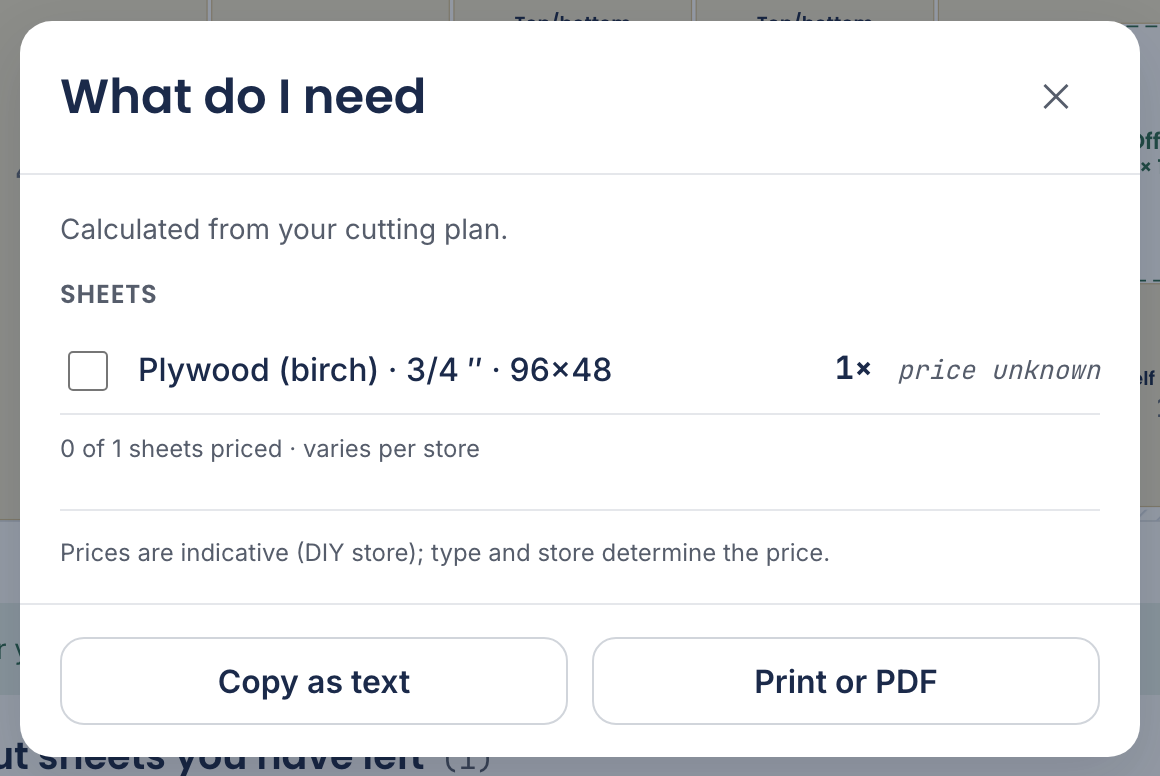
The list has three parts: Sheets, Edge banding and Hardware. What is in it follows from your project; there is nothing to count yourself. The headings and every hardware line have an i-button: what it is, what it does in your cabinet and what to buy in the store (with brands that are actually stocked there). Cam locks, shelf pins and hinges come with a drawing. In the text version (Copy as text) the first sentence of that explanation sits under every hardware line.
The three parts
- Sheets
- How many sheets of which kind. Calculated from your cutting plan. If you use your offcut stock, it says Calculated from your cutting plan, offcuts subtracted. and each row shows 2 from stock.
- Edge banding
- How many metres of banding you need: 21 ft edge banding. Edges already on the sheet are already subtracted. See Grain and edge banding.
- Hardware
- Counts follow from your cabinet; you choose the exact type. Hinges, drawer slides, shelf supports, handles, rails and wall anchors. See Drawers, doors and hardware.
About the prices
A guide price follows the sheets when you picked one from the library or entered a price yourself: estimate from $ 48.00 or from $ 48.00 ea. With nothing there you see price unknown or varies per store.
Below the list it says how much of it is priced: 4 of 6 sheets priced. So you know whether the total means anything or is only half the story.
Taking it to the store
Three ways: Copy as text puts the list on your clipboard as text (you get Copied ✓ as confirmation), Print or PDF puts it on paper, and in the PDF you tick Shopping list with prices. See Export and print.
If copying fails, the tool says so: Couldn't copy, please select and copy manually.