
cutlistlab › Manual › Crosscutting: battens and beams
Chapter 15
Crosscutting: battens and beams
Battens, baseboards, profiles and framing: everything you buy by length instead of as a sheet.
When to use this
Not everything is a sheet. Baseboards, battens, coving, framing timber: you buy those by length, and then only one dimension counts. That is what the Linear tab is for.
The calculation is the same idea as with sheets, but in one direction: spread your pieces over the stock lengths so you buy as few as possible and throw away as little as possible.
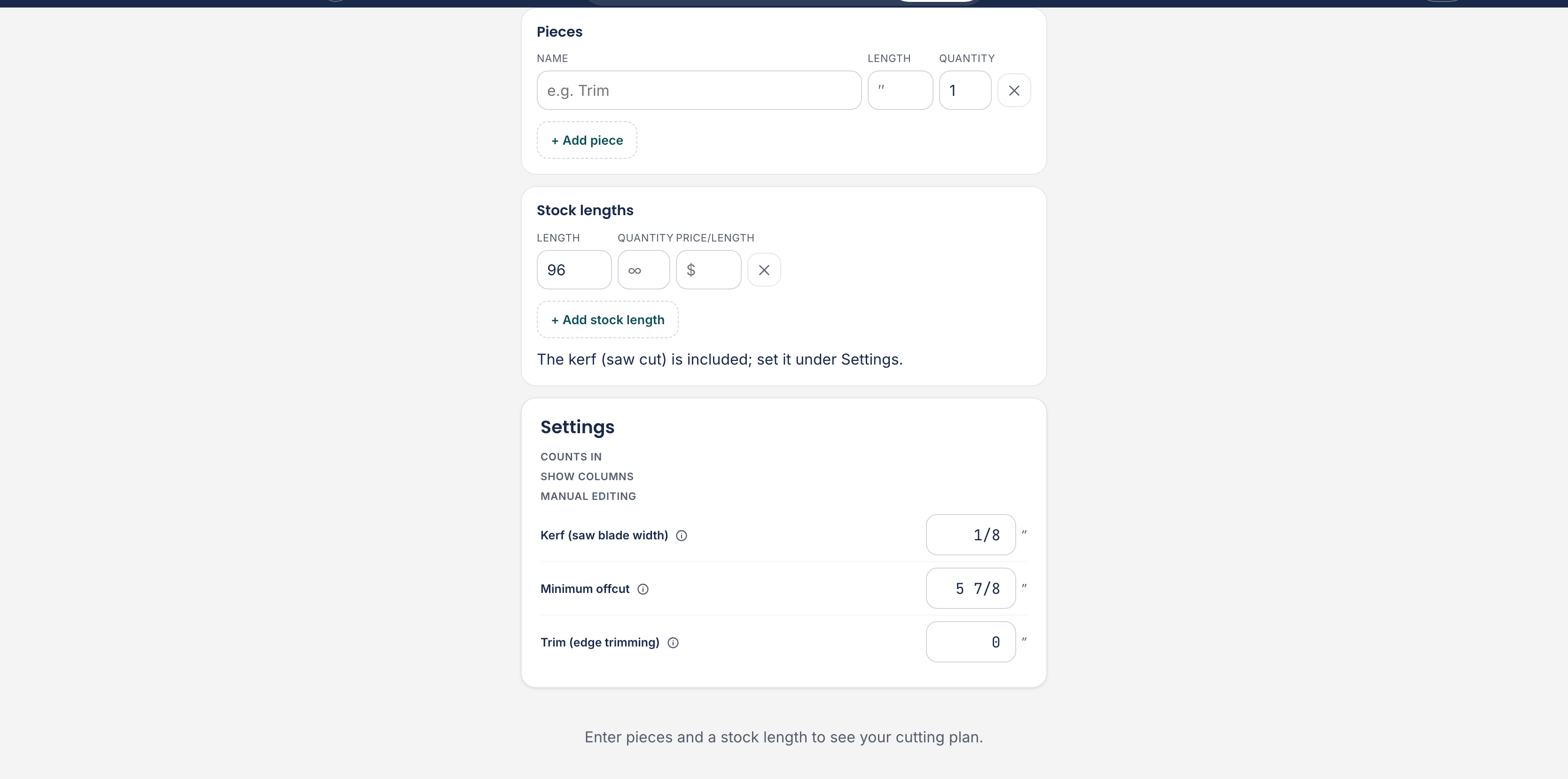
Pieces and stock lengths
The screen works like the cut list for sheets: at the top is what you have entered, below it a form to add something. Under Pieces you fill in a name (e.g. Trim), the length and the quantity, and press Add piece. You change a row in the list straight away: tap the name to rename it, or tap a measurement and type the new value.
If you use more than one kind of timber, the Material column appears. There you point at which stock length the piece is cut from; the list shows the species with the cross-section after it, for example Pine 2×4. Pieces of the same species and the same cross-section are cut from the same stock lengths, so a project with both framing timber and battens goes in one run. You only pick from stock lengths you entered, so a piece can never get timber you buy nowhere. With one kind the column stays hidden and a line above the list says what everything comes from.
A stock length has two things that together say what it is: Material is the species (e.g. pine) and Section is the size of the timber itself (e.g. 2×4). They are separate fields, because they are two different things: the same species comes in ten cross-sections, and the same cross-section exists in pine, spruce and oak. The tool only treats two stock lengths as the same when both match.
Below that you enter what the store sells: the length the material comes in, how many you want at most, and optionally the Price/length. Add several with Add stock length if the store has different lengths.
The stock length is the source: what you enter there under Material shows up as a choice on your pieces. If the material you want is not there yet, pick Other… on the piece; the tool takes you to the form under Stock lengths, where you enter the species and the cross-section once. The quantity you enter counts across your whole project, so three lengths means three, not three per material.
If you later change the species or the cross-section of a stock length, because you took something else home from the store, the pieces cut from it follow along. A line at the bottom tells you what moved, with a button to undo it. If another stock length still has the old combination, your pieces stay with that one, and the app says so too.
The kerf (saw cut) is included; set it under Settings. Kerf, Trim (square off the ends) and Minimum offcut are separate here from your sheet setting. They follow the sheet value while it says follows sheet, and go their own way as soon as you change them here. See Settings.
Reading the result
Each stock length is a bar on screen, with the pieces in it in order. The legend below says what the colours mean.
- Cut piece
- A piece you cut from this length.
- Usable offcut → stock
- What is left over and long enough to keep. Save to stock puts it in your offcut stock.
- Waste (too small)
- Too short to be of any use.
- Saw cut (kerf)
- What the saw itself removes. With many short pieces that adds up.
On the right sits the balance: lengths, used, waste, usable offcut, cuts and, when you filled in prices, cost.
With Tick off per length you work through it at the saw bench one length at a time; the counter 3 of 7 tracks where you are.
When it does not fit
- 1 piece doesn't fit any stock length. Use a longer length or a shorter piece. This is a hard clash: no stock length is long enough.
- Out of stock: 1 piece would fit, but all lengths are used. Raise the quantity or add another stock length. Here the length is not the problem, but the quantity you entered.
- There is no stock length in Plywood (birch) in your list. Add one, or pick another material on the piece. You mostly see this in an older project you opened: the piece points at a material that is not in your stock list.
- The stock length in Plywood (birch) has no length yet. Fill in how long the bar is. So the stock length is in your list, you just have not said how long it is.
- Not counted: rows without a length (2). Rows with a name but no length do not take part; the percentage then covers the rest.
- Enter pieces and a stock length to see your cutting plan. Not enough is entered yet to calculate anything.
Framing from your cabinet design
If you design a cabinet with a plinth, it belongs on a frame. The tool adds that itself: A cabinet with a plinth should sit on a base frame. We added 2 rough spruce 2 × 3 rails to your linear cut list.
If you change the species on that framing, the tool remembers your choice on the cabinet: a later change to the plinth will not write it back. The cross-section does follow the plinth height, because that decides which timber physically fits underneath.
Those pieces appear in your linear list with the origin Base frame, with the species and the cross-section already filled in, and the tool adds a stock length of that same timber. That stock length carries the label suggested: change it and it becomes your row and stays. Added automatically for the plinth. Updates when you change the plinth. If the given height is not a standard timber size, the tool says so: Note: 4" is not a standard timber size. Cut the rails to size from a 2 × 3.