
cutlistlab › Manual › Cut list and cutting order
Chapter 10
Cut list and cutting order
The list of sizes to tick off, and the step-by-step order in which you cut.
The cut list
Below the figures sits an expandable block Cut list. It lists every piece with its sizes, grouped per sheet, so at the saw bench you know exactly what you are making.
If you turn on Show codes (P1-S5-7) after calculating, each part shows Found in with the codes of its pieces, for example P1-S5-7. That way you find a piece again in the stack of its panel after cutting. If the project has boards of more than one thickness, each part also shows its board thickness: on a large screen as the third dimension (820 × 585 × 15), on a phone as a line under the size.
On the right of the header sits the total number of pieces, for example 2 pieces. Mind the difference with the numbers in the left column: those count rows, and a row with 4× behind it yields four pieces. The total in the header counts pieces, so that is the number you need when printing labels or paying for material. You can see it with the block collapsed too.
If you cut roughly from the sheet first and to final size afterwards, pick By width or By length above the list instead of By number. The list then shows every cut piece on its own line, grouped by size, with the code in front and a box to tick. By width always counts the narrowest side of the piece, by length the longest, however the piece stands in the cabinet. That way you set the saw once per size. With Narrow first or Wide first (by length Short first or Long first) you choose whether the size goes up or down, so you only adjust the saw in one direction. The size in the header of each group is the cutting size: without edge banding you apply yourself. With oversize set, the rough size is shown small under the name. Within a size the pieces are ordered by sheet and cut, so per stack. What you tick off by width is separate from what you tick off by length. Printing and the PDF follow the choice; the app remembers it on this device.
With By size the list groups by width and length together: first the narrowest width with the shortest length, then the same width with the next length, and so on, then the next width. Every group is therefore one size, shown in the heading as length × width as on the label, for example 305.9 × 25 mm. Behind the code of every piece is the intermediate piece it comes from, for example from P1-S46 (2): the piece you cut free at cut 46 of panel 1. So you take the piece with only that size from the stack, set the saw to the width and rip strip after strip. That intermediate piece code is also shown with By width and By length. Choose By size and the labels follow the same order; see Labels.
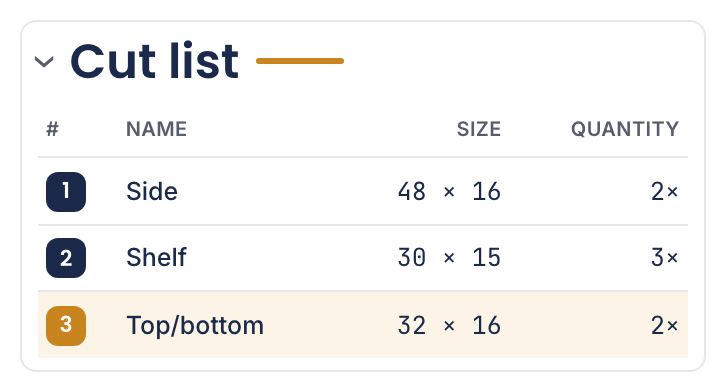
Not sure which piece a row is? Tap or click the row. Every copy of that part then lights up in the drawing, and so does the row itself. If none of them is in view, the drawing scrolls to one. Another tap on the same row clears it. With a mouse you do not even have to click: hovering over it does the same.
Tap or click a part in the drawing to select and adjust it. Its cut-list row lights up. On desktop the list on the right scrolls along; on a phone the page stays by the selected piece. Tap its row to return to the piece. Click beside the pieces to clear the highlight.
Sizes in your chosen unit. The cut size is what you actually cut: with edge banding it becomes smaller than the final size (the banding brings it to size). The banding column shows the sides (L/R/T/B) and the thickness; an asterisk (*) means the banding is already on the sheet and the cut size is not corrected there. The optimizer works on the cut size.
To put the list in a spreadsheet or send it to a cutting service, use Cut list as CSV under Export. See CSV in and out.
The cutting order
A cutting plan says where the pieces sit, but not in which order to cut. That is in Cutting order: every cut as a separate step, in an order you can actually work through. Where pieces of the same height sit side by side in an intermediate piece, you trim them with one continuous cut where possible instead of one by one, so you move the fence less often.
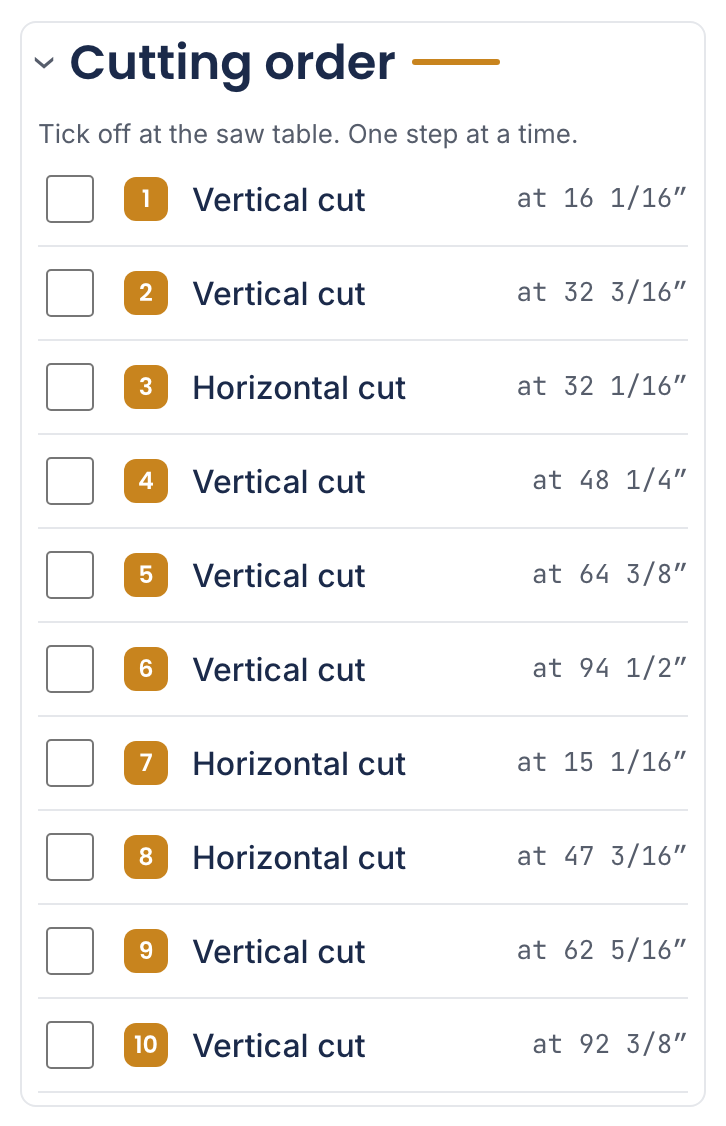
Each step says whether it is a Vertical cut or a Horizontal cut and at what measurement. The measurement is what you set on the fence: from the left or top edge of the piece you are holding at that moment to the cut line, not from the edge of the original sheet. The blade falls to the right of or below the line. Tick off with the box. Tap a cut to see it in the drawing. The measuring-direction explanation is behind the info button above the steps.
Tap a cut (on the text, not on the box) and it lights up thick in the drawing: the cuts before it turn grey, the cuts after it lighter, and Show saw cuts switches on by itself. Tap it again, press Escape or tap beside the cuts in the drawing to clear it; Show saw cuts then goes back to how you had it. Tick off the highlighted cut and the highlight moves on to the next one. On a phone the page scrolls to the panel if it is out of view, with a button under the panel to go back to your line. Fullscreen carries on from the cut you picked.
Under every cut there is a code, for example P1-S5: panel 1, saw cut 5. The same code is on the labels of the pieces that come free at that cut, with the part number behind it (P1-S5-7). See Labels. If you carry on cutting in a piece that is already off the panel, the line also says where that piece comes from, for example from P1-S1 (2): (1) is the piece left of or above cut 1, (2) the piece right of or below it, as the drawing is shown. If you rotate the panels with Rotate sheets 90°, the top piece of a cut that used to run horizontally ends up on the right and becomes (2); the list, the drawing and the labels follow that. So the number follows the drawing on the screen you are looking at. With Intermediate pieces switched on, tap such a code to see that piece in the drawing: it gets a thick frame and its size is shown under the panel. In Fullscreen, with that switch on, the piece of the current cut lights up by itself.
If a sheet holds a piece narrower than 150 mm (6 in), the cuts of that sheet start with Narrow strips on a table saw: push the last part through with a push stick, never with your hand. That applies when you rip the strips on a table saw along the fence: at the last part your hand gets close to the blade. With a circular saw and a guide rail you move the saw, not the sheet; the line is not meant for that.
Cutting in fullscreen
With Fullscreen the screen goes full size, and you walk through the cuts one by one. Follow the cutting sequence fullscreen, cut by cut. That is the mode for propping your phone or laptop next to the saw.
- To the start
- Back to the first cut.
- Previous cut
- One step back.
- Next cut
- One step forward.
- Play
- Run through automatically; Pause stops it.
- Saw cuts
- Show or hide the cut lines while you follow along. On shows where the next cut goes; off gives a calmer picture of the sheet.
- Fit
- Fit the sheet to the screen. Zoom in and Zoom out do what they say.
- Exit fullscreen
- Back to the normal screen. Escape works too.
Cut list for the store
A full sheet does not fit in an ordinary car. Below the cutting order sits the Cut list for the store card; the Store button in the bar above the lists (Cut list, Cutting order, Store) takes you straight there, even with a long cut list. Turn on Have the store make the first cuts and pick your car or a custom size under What fits in your car?. The app then picks, per sheet, the cuts you ask for at the store: first cuts from your own cutting plan (you make them anyway, they cost no material), and only if an offcut stays too large an extra cut through the offcut. In the drawing a cut from your plan is solid and an extra cut dashed; parts are shown with their names, the offcut is hatched.
If a part is itself larger than your cargo space, such as a 2 metre side panel, the app names it: a cut does not help, so choose a larger cargo size, a roof rack or delivery. If your oversize is 0 and a store cut falls exactly on the edge of a part, the app suggests 5 mm oversize per side: store cuts are rough. With Print cut list for the store you take the list along; at home you continue with the full cutting plan.
The overview is always at the top of the card: how many sheets fit in the car and what is too large. Below it each sheet has its own block with the number of cuts and whether it fits. With more than three sheets those blocks are closed; tap a sheet to open it, or use Expand all and Collapse all. A sheet number in the overview opens that sheet and jumps to it. On a phone the cargo size and offcut choice sit collapsed below the overview, with your choice in the heading. You can also print the list through Export: choose Print store cutting list there. If Have the store make the first cuts is off, that item reads Set up store cutting list and opens the card so you pick your car first. The PDF includes the list as a section of its own once Have the store make the first cuts is on.
If you would rather have the sheet cut into equal pieces first, choose 2, 3 or 4 under Cut sheet into strips first, and under Strip direction across (the sheet gets shorter) or lengthwise. Enter the store saw kerf under Store kerf for strip cuts if it is not 4 mm. A large project takes a few seconds, so it only starts with Calculate with strips. You first see whether everything then fits in your car, and which parts no longer fit on a strip; if it does not fit yet, the app says how many strips would. Below that, whole sheets, sheet cost and store cuts now and with strips sit side by side. With Apply the cutting plan is calculated on the strips; the card then shows the strip cuts per sheet first. Restore previous layout puts your old layout back exactly, including what you moved by hand.